Patient Consultation
During the patient consultation, the patient is evaluated to ensure the patient is a candidate for aligners. A full evaluation is conducted with intraoral scans, clinical images and X-rays.

Appliances / U Aligner

Your journey to a picture-perfect smile begins here. U Aligner can treat a wide variety of cases and malocclusions including spacing, crowding, open bite, crossbite, underbite, and overbite.
Get StartedTreatment Workflow
Our trained team of specialists have treated patients of all ages including teens and kids who wish to build a captivating smile for a bright future.
During the patient consultation, the patient is evaluated to ensure the patient is a candidate for aligners. A full evaluation is conducted with intraoral scans, clinical images and X-rays.
Once the intraoral scans and images have been submitted, a treatment plan is generated and sent to the doctor to review within 48 hours.
Once the treatment plan has been approved, the manufacturing of the aligners begins. The aligners will be shipped within 10 business days.
U-Aligner requires patients to wear the aligner trays for at least 20 hours or more. The trays must be removed during meals and consumption of hot drinks.
After wearing all sets for a minimum of 2 weeks per set, a new scan is required to order the patient retainer.
Indications
From crowding to bite correction, U Aligner addresses the most common malocclusions with clear, custom-fabricated trays.

Overlapping or rotated teeth signal crowding, which happens when the jaw is too narrow to support every tooth. Guided expansion in childhood — or extraction in severe cases — creates the space teeth need to erupt in a better position.
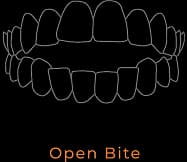
An open bite means the upper and lower teeth do not meet when the jaw is closed. It often follows childhood thumb-sucking or tongue-thrusting, and can also point to a skeletal development issue or TMJ syndrome.
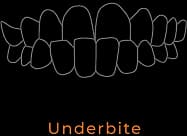
In an underbite, the lower jaw extends past the upper jaw so the bottom teeth sit in front. Usually genetic, it can cause jaw discomfort while chewing or talking, and is effectively treated in kids as young as 7.

An overbite is an excessive overlap of the upper front teeth over the lower. Left uncorrected, deep overbites accelerate tooth wear and jaw strain. Guided movement addresses it most effectively when treated early.
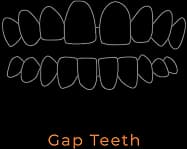
Spacing between teeth can stem from missing teeth, excess room in the arch, or childhood habits like tongue-thrusting. Gaps may appear between two teeth or many, and can affect one or both dental arches.
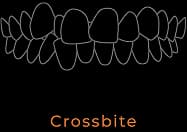
A crossbite occurs when upper teeth sit inside or fully outside the lower teeth, misaligning the jaw and risking TMJ disorder. Causes include genetics, irregular eruption, mouth breathing, and late thumb-sucking.
Digital Dentistry
Start aligner cases with a portal-supported workflow built for scan intake, planning, approval, production, and shipping visibility.
Get StartedTo create an account, the U-Aligner Portal requires basic information such as office name, office address, and an email address. The email provided will be used for account activation, log in, and system notifications. A password is also required to access your account. After successful registration a team member will activate your account. An email confirmation will be sent. If the office does not have an account set up with Universal Orthodontic Lab, a new account will be created by a customer service representative.
The dashboard is a central gateway for using the portal. On the top right the option to change the profile settings is available. The profile section allows you to manage personal details such as office information and personal credentials. This information will be kept strictly confidential and used for contact purposes only. The case section provides a list of cases waiting for review, accepted and rejected cases. This will help the office monitor their cases and check status on the submitted cases.
The case section provides a list of cases waiting for review, accepted and rejected cases. By selecting “+New Case” on the top left, you will be directed to a submission form. This will result in a multi-step process in which you will be required to upload documents, photos and enter specific treatment information. Each step in the process can be saved and completed at a later time via the dashboard.
In the patient information section you will be required to enter all relevant patient and treatment information.
In this section you can upload the initial images and intra-oral scans. All scans must be in STL file as any other version will not be accepted. When uploading images, the first step is to select the images from your local computer. The images required are: full face at rest, full face smiling, right side profile, left side profile, retracted anterior frontal, retracted buccal right, retracted buccal left, maxillary occlusal, and mandibular occlusal. Cases with incomplete images will not be accepted.
Once the case has been submitted, our team of experts will evaluate the submitted case. Please be advised that the U-Aligner system is designated to make minor to moderate corrections and is not a substitute for comprehensive orthodontic treatment. After receiving your case, we may inform you that the U-Aligner system will not be able to achieve the desired results. Please allow 48-72 hours to receive a notification that the treatment plan is ready to review. A notification will be sent via email.
Once the treatment plan has been uploaded, any modifications can be requested. A comment can be left to our experts for modification requests. All questions or requests will be answered within 24 hours. A notification email will be sent to the email address provided for the account. A lab report will also be available for the clinician to review the treatment instructions.
Once the treatment plan has been approved the case will be sent to production. The production lead time is 7-10 business days. Once the case has shipped, the status on the case will change to shipped.